Solo Developer Builds a Free Website to Android App Converter: A 6-Month Retrospective

ToApp was released on February 22, 2026. By June 6, it had reached version 1.10.0. That's a little over three months of active development, plus a few more weeks of writing the companion website you're reading right now. In that time, ToApp went from "a barely usable first version I built for myself" to a free website to Android app converter used by more people than I ever expected — all while staying free, ad-free, registration-free, and processing everything locally on the user's phone.
This article is a retrospective. Not a marketing piece, not a victory lap — a real look back at what I did, why I made the decisions I made, and what I learned building a web-to-app converter as a solo developer. I'll cover three things: the version timeline (what actually happened, version by version), the key design decisions and their trade-offs (why local processing, why WebView, why free), and the companion website's SEO strategy (how a static marketing site feeds the app's download numbers).
If you're an indie developer thinking about building a utility app, or just curious about what goes into a free APK generator like ToApp, this is for you.
Why Write a Retrospective
Most app changelogs end with a version number and a bullet list. That's fine for tracking what changed, but it doesn't explain why. Why did ZIP local packaging — a feature that's now central to ToApp — only show up in v1.9.1, three months after launch? Why does ToApp process everything locally when every other web-to-app tool runs in the cloud? Why did I decide to pause updates after v1.10.0?
These questions matter because the answers reveal the trade-offs that shape a product. A changelog tells you what shipped. A retrospective tells you what didn't ship, what almost shipped, and what shipped only because users kept asking. For a solo developer, that gap between the changelog and the real story is where most of the actual work happens.
There's also a selfish reason: writing this forces me to look at the last six months honestly. When you're building alone, you don't get postmortems from teammates. You have to write your own.
The Timeline: February to June
Here's the full version history, but organized the way I actually remember it — not as a list of features, but as a series of phases. Each phase had a different focus, and the focus shifted based on what users needed most at the time.
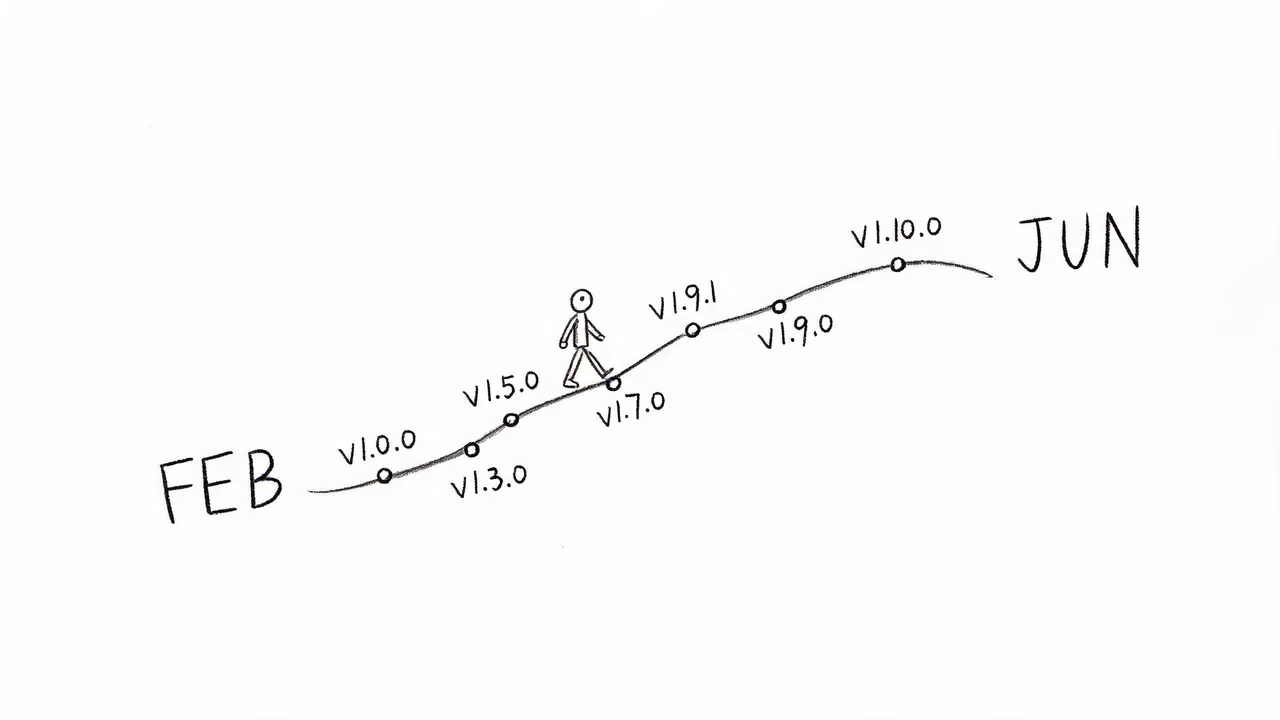
Phase 1: "Barely Usable" (v1.0.0, February 22)
The first version of ToApp shipped on February 22, 2026. The changelog entry for v1.0.0 is unusually honest: "Had the idea to build this myself, so started development and released a barely usable first version." That's not marketing language — that's literally what happened. I wanted a tool that could convert a website into an Android APK without setting up Android Studio, registering for developer accounts, or dealing with Gradle builds. Nothing like that existed for free, locally, on a phone. So I built one.
v1.0.0 only did one thing: enter a URL, get an APK. No local file support, no multi-page navigation, no dark mode toggle in the generated app. But it worked, and it ran entirely on the phone. That last part was the non-negotiable constraint from day one — I'll come back to why in the design decisions section.
Phase 2: Stability and Cleanup (v1.0.1 – v1.2.2, late February)
The first two weeks were pure stabilization. v1.0.1 fixed theme switching and added a changelog page. v1.2.0 added the privacy policy consent flow, the feedback feature, WebView file downloads, and — importantly for a free app — a sponsorship reminder. v1.2.1 fixed the lag when returning to the list page and added fullscreen video playback. v1.2.2 fixed a dark mode regression.
Notice the pattern: the first ten days after launch were almost entirely bug fixes. This is normal. No matter how much you test before release, real users find edge cases you didn't imagine. A solo developer ships bugs; the question is whether you fix them quickly. I was shipping fixes every day or two in this phase.
Phase 3: The Navigation Problem (v1.3.0, March 3)
v1.3.0 is when ToApp started becoming genuinely useful. The headline feature was the collapsible bottom navigation bar — swipe down to hide it, press volume up to bring it back. This sounds small, but it solved a real problem: the bottom nav bar covered content on websites that weren't designed for apps, and users wanted fullscreen browsing. The volume-up-to-show trick avoided conflicts with web page touch interactions.
This version also fixed two things that had been quietly breaking: package name auto-generation (it wasn't correctly deriving the package name from the app name) and APK signing compatibility across different keystore formats (BKS, JKS, PKCS12). Signing compatibility matters more than you'd think — a signing bug means the generated APK can't be installed, which makes the entire tool useless.
Phase 4: Persistence and False Positives (v1.4.0 – v1.5.0, early March)
v1.4.0 added auto-update detection — the app checks for new versions on startup and offers a one-click download. Small feature, big quality-of-life improvement for users who don't check the changelog manually.
v1.5.0 was a bigger deal than its changelog suggests. Two things happened here. First, mobile security apps were flagging ToApp-generated APKs as malware (a false positive — a.gray.BulimiaTGen.h). I fixed this by switching to official signing, enabling code obfuscation, and optimizing resources. If you've ever wondered why ToApp's generated apps don't trigger security warnings the way some other web-to-app tools do, this is why. Second, v1.5.0 added full storage support: Cookie persistence and IndexedDB. This meant generated apps could actually remember things — login states, cached data, app state — instead of resetting every time you opened them.
Phase 5: Real Browser Behavior (v1.6.0 – v1.7.0, mid-March)
v1.6.0 was a tiny release (appreciation list), but v1.7.0 was another meaningful step: generated apps could now request browser-level permissions — camera, microphone, location, file upload. This is what made ToApp viable for use cases beyond "wrap a static site." After v1.7.0, you could build an app that actually used device hardware, not just displayed web content.
Phase 6: The Big One — Local File Packaging (v1.8.0 – v1.9.3, May)
There's a gap between mid-March and early May in the changelog. That gap is real life — I had limited time, and the next feature was the hardest one to build. v1.8.0 shipped on May 8 with a batch of UX improvements (disable pull-to-refresh, camera upload in generated apps, dialog stability, project sorting).
v1.9.1, on May 31, is the version that changed ToApp's identity. This is when ZIP local file packaging shipped. Before v1.9.1, ToApp was a web-to-app converter — you gave it a URL, it gave you an APK. After v1.9.1, ToApp also became an offline app builder: you could give it a ZIP of local HTML/CSS/JS files, and it would package them into a standalone app that ran without internet — a true ZIP-to-APK conversion that needed no server. This is the feature that made the "Build Your First Android App with AI" tutorial possible — without local file packaging, there's no way to convert AI-generated HTML into an APK.
v1.9.3, on June 2, added edge-to-edge gesture navigation adaptation — making generated apps feel native on modern Android versions with gesture navigation.
Phase 7: Pause (v1.10.0, June 6)
v1.10.0 shipped on June 6. The changelog for this version is unusually candid: "Due to economic and time constraints, ToApp will not be updated for a long period going forward." This wasn't a marketing decision or a strategic pivot. It was an honest acknowledgement that I couldn't keep up the development pace without burning out, and the app wasn't generating enough income to justify the time it required.
I'm not going to pretend this was an easy call. But it was the right one. Shipping a buggy update because I was too tired to test properly would have been worse than pausing. All historical versions remain available on the changelog page, and the FAQ covers common issues.
What I'd tell my past self about the timeline: The version that mattered most wasn't the one I was proudest of (v1.0.0, the first release). It was v1.9.1, the ZIP local packaging update — a feature users had been asking for since launch, that I kept deprioritizing because it was hard to build. The lesson: if your users keep asking for the same thing, that's the thing to build, even if it's the hardest one on your list.
Key Design Decisions and Their "Why"
A retrospective that only lists features isn't honest. What matters more is the decisions that shaped those features — the trade-offs I made, the things I chose not to do, and the constraints I refused to compromise on. Here are the four decisions that defined ToApp.
Decision 1: Local Processing, Not Cloud Packaging
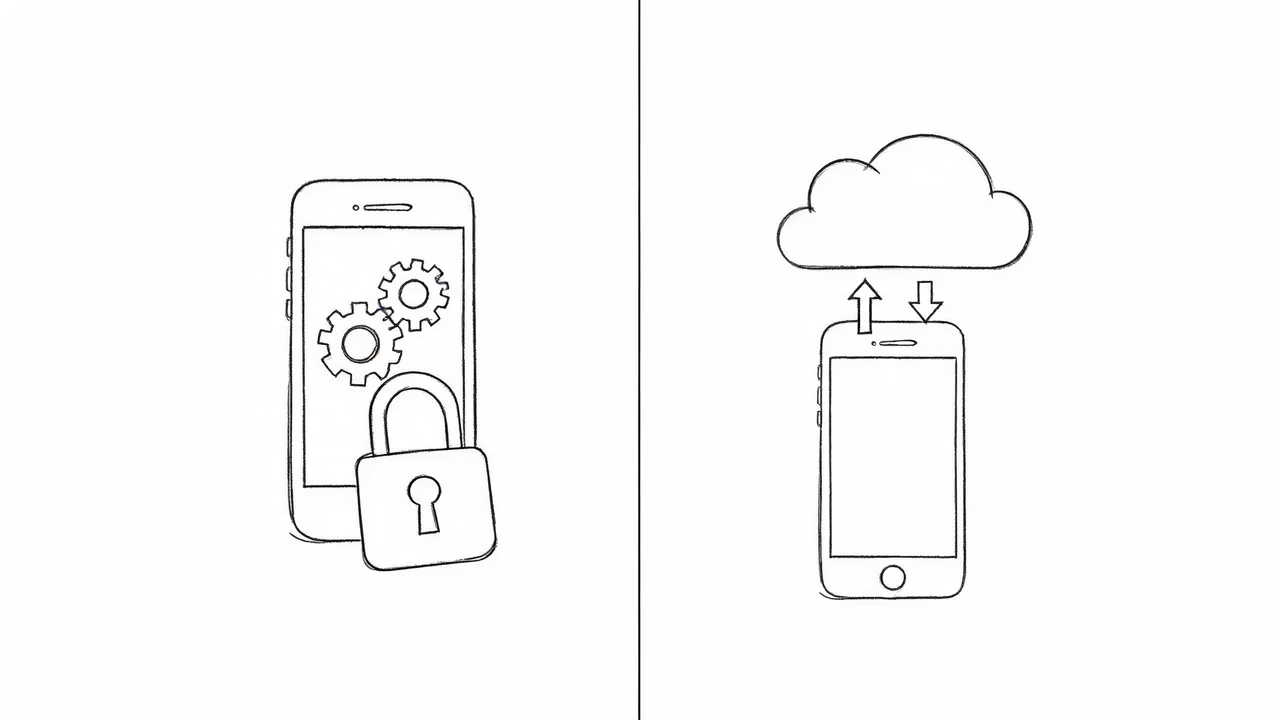
This is the decision that shaped everything else. Every other website to Android app converter I'm aware of — AppsGeyser, GoNative, WebIntoApp, AppMySite — runs its packaging in the cloud. You upload your website URL or files to their server, their server builds the APK, and you download the result. ToApp doesn't. All packaging happens on the user's phone, in WebView, with no internet connection required.
The trade-offs:
- Cost: Cloud packaging means server costs. Someone has to pay for the build servers. Usually that "someone" is the user, via subscriptions or ads, or via their data being sold. Local processing means zero server costs for me, which is why ToApp can be free forever.
- Privacy: Cloud packaging means your website URL, your HTML files, your icons, and your package configuration all leave your device. Local processing means none of that ever leaves your phone. For users packaging internal company sites or personal files, this is the difference between "yes, I can use this" and "no way."
- Speed: Local packaging is faster. No upload, no queue, no download — generation takes seconds, not minutes.
- Feature velocity: This is the downside. Cloud packaging lets the developer roll out fixes server-side without asking users to update. Local processing means every fix requires a user to download a new APK. This is part of why ToApp's update pace slowed over time — each release had to be solid, because I couldn't patch it remotely.
If I were building ToApp again, I'd make the same call. The privacy and cost advantages outweigh the velocity cost for a tool that's fundamentally about putting your own content on your own phone.
Decision 2: WebView Architecture, Not React Native or Flutter
ToApp generates hybrid apps — native Android shells that render web content via WebView. I could have built a tool that generates React Native or Flutter apps instead, which would give generated apps more native feel and better performance. I didn't, for one simple reason: WebView is the only architecture that lets a user convert any website or HTML file into an app without rewriting it — the HTML-to-APK conversion that defines ToApp would be impossible otherwise.
If you have a WordPress blog, a Hexo static site, a hand-written HTML portfolio, or an AI-generated single-page tool, you don't have React Native code — you have HTML. WebView is the only way to package that existing content as an app without a complete rewrite. That's the entire premise of ToApp. Switching to a React Native or Flutter generator would mean telling users "first, rewrite your website as a React Native app" — which defeats the point.
The trade-off is that WebView apps will never feel as smooth as truly native apps. Animations can be janky, scrolling can lag on complex pages, and some device APIs require extra bridging. For ToApp's use cases — personal tools, blog wrappers, business sites, offline utilities — this is acceptable. For a high-performance game or a complex social app, it isn't, and ToApp isn't the right tool for those.
Decision 3: Free Forever, No Ads, No Registration
ToApp is free, has no ads, and requires no account. This isn't a freemium model where core features are free and advanced features cost money. All features are free. The decision was straightforward: local processing means no server costs, and no server costs means I don't need to charge users to cover infrastructure — which is why ToApp can work as a free APK generator forever. The only ongoing cost is the website hosting (a Cloudflare R2 bucket for the APK and a static site for these pages), which is negligible.
The trade-off is that "free forever" means there's no revenue stream to fund continued development. This is the real reason v1.10.0 paused updates — not because I lost interest, but because free tools don't pay rent. The sponsorship button on the About page helps, but it doesn't cover the time investment. If you're an indie developer considering the same model, know going in that "free forever" is a promise to your users and a constraint on your future self. Don't make it lightly.
Decision 4: Not Publishing to Google Play
ToApp-generated APKs are standard Android packages and can be submitted to Google Play, but ToApp itself isn't on Play Store, and I don't recommend that users try to publish their generated apps there either. The reason is Google Play's review policy for WebView-based apps, which is genuinely strict — many wrapper apps get rejected or removed. Fighting that review process as a solo developer isn't worth the time.
Instead, ToApp is distributed via this website, and generated apps are distributed directly by their creators (sideloading, internal distribution, sharing the APK). This works for ToApp's actual use cases: personal tools, family gifts, internal business apps, prototypes. None of those need Play Store distribution. If you specifically need Play Store presence, ToApp isn't the right tool — and that's an honest answer, not a limitation I'm trying to hide.
You can compare ToApp with other web-to-app tools to see how these decisions stack up against alternatives.
The Companion Website and SEO Strategy
This is the part of the retrospective I haven't seen covered elsewhere, and I think it's the most useful section for other indie developers. Most app changelogs and personal blogs skip it entirely. But for a free tool with no marketing budget, the companion website isn't a nice-to-have — it's the only acquisition channel. Here's how this site is structured and why.
The Site Architecture
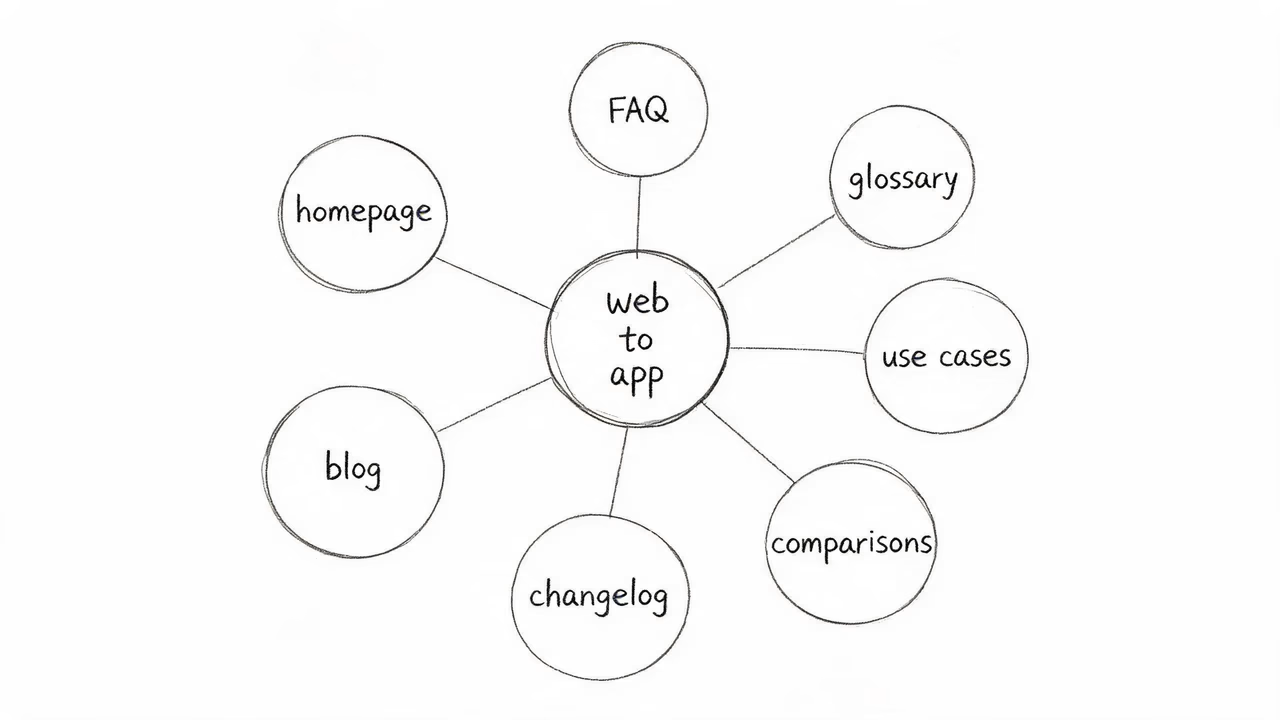
The ToApp website isn't a single landing page. It's a content site organised into several directories, each with a specific SEO purpose:
- Homepage — the conversion-focused landing page. Explains what ToApp does in 3 steps, shows screenshots, and has the download button. This targets the head terms "website to android app converter" and "free apk generator."
- FAQ — answers the questions users actually search for. Each FAQ entry is marked up with
FAQPageschema for rich snippets. This captures long-tail queries like "how to hide bottom navigation bar in webview app." - Glossary — explains the underlying concepts: WebView, APK, PWA, Hybrid App, Web to App. Each term page targets a definition query and links back to the homepage and FAQ. This builds topical authority for the "website to android app" subject cluster.
- Use case pages — six pages, one per scenario: blog to app, business, e-commerce, portfolio, offline apps, developers. Each targets a specific intent ("turn my blog into an app," "offline web app maker") and links to the download.
- Comparison pages — four pages comparing ToApp with AppsGeyser, GoNative, WebIntoApp, and AppMySite. These capture comparison-stage search traffic ("toapp vs appsgeyser," "free alternative to gonative") and convert users who are actively choosing between tools.
- Blog — long-form content for tutorials, stories, and concept explanations. This is the top-of-funnel content that brings in users who aren't yet searching for "web to app" but are searching for "build my first android app" or "html to apk tutorial."
- Changelog — version history. Builds trust with existing users and captures searches from users checking if ToApp is actively maintained.
The SEO Logic: Topic Clusters, Not Keyword Stuffing
The site is built around a topic cluster model. The core topic is "web to app" — the act of converting a website or web files into an Android app. Every page on the site supports this cluster:
- The homepage targets the head term.
- The glossary pages target definition queries and establish topical authority.
- The use case pages target intent-specific queries.
- The comparison pages target bottom-of-funnel decision queries.
- The blog targets top-of-funnel educational queries.
Internal linking is deliberate. Every page links to the homepage, the FAQ, the glossary, and the download section. The glossary pages link to each other and back to the homepage. The blog links to relevant glossary terms inline (you've seen several of those links already in this article). This creates a dense internal link graph that helps search engines understand the site's structure and pass authority from page to page.
Multilingual: Chinese and English with hreflang
The site is fully bilingual — Chinese at / and English at /en/. Every page has hreflang tags pointing to both language versions, with x-default set to English. This isn't optional for a tool like ToApp: the app's user base is split between Chinese-speaking and English-speaking users, and serving both languages properly means double the search surface area.
The trade-off is maintenance cost — every page exists in two versions, and changes need to be made in both. This is why I keep the page count manageable. Adding a new blog post means writing it twice (you're reading the English version; there's a Chinese version too). But the SEO benefit is significant — the Chinese and English search markets are largely disjoint, and being present in both doubles your potential reach.
Structured Data: Schema.org on Every Page
Every page on the site has application/ld+json structured data. The homepage uses SoftwareApplication and HowTo schemas. The FAQ uses FAQPage. The glossary uses CollectionPage and ItemList. The blog uses BlogPosting, BreadcrumbList, and (for tutorials) HowTo. This article you're reading uses BlogPosting, Article, and BreadcrumbList.
Structured data doesn't directly improve rankings, but it does help search engines understand page content and enables rich snippets in search results. For a small site competing against larger players, rich snippets are a meaningful visibility win. The FAQPage schema alone has made ToApp's FAQ entries appear as expandable rich results for several queries.
What Actually Drives Downloads
Here's the honest part. The homepage converts the best — users who land there with intent to download a web-to-app tool convert at a high rate. But the homepage doesn't get the most traffic. The bulk of organic traffic comes from the long-tail: the FAQ entries, the glossary definitions, the use case pages, and now the blog.
The comparison pages are particularly valuable because they capture users at the decision stage — someone searching "appsgeyser alternative" or "free alternative to gonative" is already convinced they want a web-to-app tool, they're just choosing which one. That's a high-intent user, and a comparison page that honestly explains the trade-offs (ToApp is free and local but has a smaller feature set than paid alternatives) converts better than a comparison page that pretends ToApp is better at everything.
What I'd tell other indie developers about SEO: The companion website isn't a side project — it's the product, for acquisition purposes. The app is what users install, but the website is what makes them find the app in the first place. Spend as much time on the site's content structure as you spend on the app's code. And write the content you wish existed when you were researching your own tool — that's what your users are searching for.
Closing: On Pausing and What Comes Next
ToApp is paused, not abandoned. The app still works, the website still gets updated (this article is proof), and the changelog page still lists every version for download. What's paused is active feature development on the app itself.
I want to be honest about why. Building a free tool as a solo developer is sustainable only if one of two things is true: either you have another source of income that covers your living costs, or the tool generates enough support (donations, sponsorships, paid tiers) to justify the time. ToApp has generous supporters — the appreciation list in the app is real, and I'm grateful to everyone on it — but it doesn't cover the time a serious update cycle requires. So I paused rather than ship something half-tested.
What comes next? I don't know. I have a list of features I'd like to add eventually: better offline caching in generated apps, more navigation styles, possibly a project sharing system. But I'm not going to promise a timeline I can't keep. The honest answer is "when I have the time and the resources, I'll come back to it." Until then, ToApp v1.10.0 is a stable, usable, free website to Android app converter that does what it says it does, and this website will keep explaining how to use it.
If you're reading this as a ToApp user: thank you. The fact that enough people cared about this tool to keep using it — and to keep asking for features, reporting bugs, and sending feedback — is the reason it got as far as it did. If you're reading this as an indie developer: I hope the timeline, the design decisions, and the SEO section were useful. Build the thing you wish existed. Make it free if you can afford to. Be honest about the trade-offs. And when you need to pause, pause — the internet is full of abandoned projects that would have been better off as honest pauses.
That's the retrospective. Six months, fourteen versions, one pause, and a companion website that's still growing. Thanks for reading.

Try ToApp — Free, Local, No Signup
ToApp is a free website to Android app converter. Turn any website or local HTML/ZIP files into an Android APK, entirely on your phone. Free forever, no ads, data stays on your device.
Download ToApp Free →